

This article is for users of Oracle Database version 10g+ who want to convert their Oracle single instance database to RAC. I will provide detailed procedure for converting non-RAC database to RAC and we will use Oracle Automatic storage management (ASM) as shared storage.
In general, if the database is small then you can consider installing a new RAC database and export/import your current database. If the database is large then using RMAN for migration would be one of the preferred methods. If your single instance database is running an older version (than 10g) and you want to migrate to a higher RAC version then the preferred method is to fist upgrade your existing single instance database, test the upgraded database and then migrate to RAC.
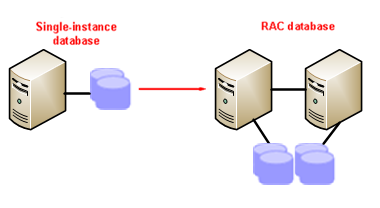
In most of the cases, users want to create a new environment for RAC and we are assuming that the below prerequisites are met, and the RAC environment is already installed with ASM as shared storage and ready for database migration.
Prerequisites on all the nodes in the cluster
- Install and configure Clusterware
- Install and configure Automatic Storage Management (ASM)
- Install Oracle Database Software
- Standalone database and RAC must be on same Database version
Please refer to the Oracle Documentation for operating system specific installation and configuration. Also refer to the Metalink note ASM Technical Best Practices [ID 265633.1] (requires a login) for ASM disk group creation based upon on the operating system and type of storage.
Method to convert single instance to RAC
We have different ways to migrate non-RAC to RAC. Here we are using the DUPLICATE DATABASE feature of RMAN to migrate single instance non-ASM database to RAC Server, which is using ASM as shared storage. Using this manual method you have full control on the duplication process. In case of any issues/errors, you just need to fix the failed setup and you do not need to redo the whole process.
We are using a two phase approach to migrate non-RAC to RAC:
- Duplicate single instance Non-ASM database to ASM using RMAN
- Manually Convert single-instance to RAC.
Overview of Non-RAC environment
| Hostname | Database Name | Instance Name | Database Storage |
| orasrv | DBORA | DBORA | ext3 |
Overview of RAC environment
| Hostname | Database Name | Instance Name | Database Storage |
| orarac1 | ORADB | ORADB1 | ASM |
| orarac2 | ORADB | ORADB2 | ASM |
If you prefer you can keep same name for RAC database. I am using a different database name in RAC environment to avoid confusion.
Please replace the xxxxxxx with actual password in below steps
1.1 Estimate used space for Non-RAC database:
Run the below query on Non-RAC to estimate used space and make sure you have enough space on RAC environment.
|
1 |
SYS@DBORA> SelectDF.TOTAL/1073741824 "DataFile Size GB", LOG.TOTAL/1073741824 "Redo Log Size GB", CONTROL.TOTAL/1073741824 "Control File Size GB", (DF.TOTAL + LOG.TOTAL + CONTROL.TOTAL)/ 1073741824 "Total Size GB" from dual, (select sum(a.bytes) TOTAL from dba_data_files a) DF, (select sum(b.bytes) TOTAL from v$log b) LOG, (select sum((cffsz+1)*cfbsz) TOTAL from x$kcccf c) CONTROL; |
1.2 Create password file and init.ora file for RAC environment:
Make sure you set the ORACLE_SID and ORACLE_HOME and create password file under $ORACLE_HOME/dbs
|
1 2 3 |
[oracle@orarac1]$ export ORACLE_SID=ORADB [oracle@orarac1]$ export ORACLE_HOME=/home/oracle/product/v10204 [oracle@orarac1]$ orapwd file= $ORACLE_HOME/dbs/orapwORADB password=xxxxxxx |
Create initORADB.ora file under $ORACLE_HOME/dbs on RAC node1. Please note that we have two ASM diskgroups i.e. +DATA, +FLASH, If you are using different names replace the diskgroup names.
The below initORADB.ora file has minimum settings. Refer to your Non-RAC init.ora file and set the required parameters.
|
1 2 3 4 5 6 7 8 9 10 11 12 13 14 15 16 17 18 19 20 21 22 23 24 25 26 27 28 29 30 31 32 33 34 35 36 37 38 39 40 41 42 43 44 45 |
[oracle@orarac1]$ cat $ORACLE_HOME/dbs/initORADB.ora <span style="color: #000000;">##############################################################</span> # FILE : initORADB.ora # DATABASE NAME : ORADB ############################################################## # Set the RAC database name db_name ="ORADB" instance_name =ORADB # set the location of the duplicate clone control file. control_files =‘+DATA’, ‘+FLASH’ #set the below parameters for default location of data files db_create_file_dest='+DATA' #set the below parameters for default location of recovery area db_recovery_file_dest='+FLASH' # set below parameter to create two members for each redo db_create_online_dest_1=’+DATA’ db_create_online_dest_2=’+FLASH’ # set two destinations if you want to multiplex the archive logs log_archive_dest_1='location=+DATA' log_archive_dest_2='location=+FLASH' # set the location as per your environment log_archive_dest_1='LOCATION=+FLASH’ log_archive_format='arch_%r_%s_%t.arc' audit_file_dest =/home/oracle/admin/ORADB/adump background_dump_dest=/home/oracle/admin/ORADB/bdump core_dump_dest =/home/oracle/admin/ORADB/cdump user_dump_dest =/home/oracle/admin/ORADB/udump # In case of 11g set below parameter as per your environment # diagnostic_dest= /home/apps/oracle #Set the below to the same as the production target db_block_size = 8192 sga_target=537919488 remote_login_passwordfile=exclusive undo_management =AUTO undo_retention =10800 undo_tablespace =UNDOTBS1 compatible = 10.2.0.4.0 |
We are not using DB_FILE_NAME_CONVERT, LOG_FILE_NAME_CONVERT parameters as most of the databases have data/redo files in multiple directories.
1.3 Configure Oracle Listener and tnsnames.ora file
Create a static listener for RAC node1 under $ORACLE_HOME/network/admin and reload because auxiliary database will not register itself with the listener:
|
1 2 3 4 5 6 7 8 9 |
<span style="font-family: Calibri;">[oracle@orarac1]$ cat $ORACLE_HOME/network/admin/listener.ora </span> SID_LIST_LISTENER = (SID_LIST = (SID_DESC = (GLOBAL_DBNAME = ORADB) (ORACLE_HOME = /home/oracle/product/v10204) (SID_NAME = ORADB) ) ) |
Add TNS entry in $ORACLE_HOME/network/admin/tnsnames.ora file on Non-RAC Server:
|
1 2 3 4 5 6 7 8 9 |
[oracle@orasrv]$ cat $ORACLE_HOME/network/admin/tnsnames.ora ORADB = (DESCRIPTION = (ADDRESS = (PROTOCOL = TCP)(HOST = orarac1)(PORT = 1521)) (CONNECT_DATA = (SERVER = DEDICATED) (SERVICE_NAME = ORADB) ) ) |
1.4 Start the database in nomount and test the connectivity
Start the auxiliary database in NOMOUNT mode on RAC node1
|
1 2 3 4 5 6 7 8 9 10 11 12 13 14 15 16 17 18 19 20 |
[oracle@orarac1]$ export ORACLE_SID=ORADB [oracle@orarac1]$ export ORACLE_HOME=/home/oracle/product/v10204 [oracle@orarac1>sqlplus /nolog SQL*Plus: Release 10.2.0.4.0 - Production on Thu Jan 19 12:42:16 2012 Copyright (c) 1982, 2007, Oracle. All Rights Reserved. SQL> connect / as sysdba Connected to an idle instance. SQL> startup nomount ORACLE instance started. Total System Global Area 541065216 bytes Fixed Size 2085288 bytes Variable Size 289410648 bytes Database Buffers 239075328 bytes Redo Buffers 10493952 bytes SQL>exit [oracle@orarac1]$ |
Test your Sql*Net connections from Non-RAC Server and you must be able to connect to the ORADB database on RAC Node1.
|
1 2 3 4 5 6 7 8 9 10 11 |
[oracle@orasrv]$ sqlplus sys/xxxxxxx@ORADB as sysdba SQL*Plus: Release 10.2.0.4.0 - Production on Thu Jan 19 14:29:23 2012 Copyright (c) 1982, 2007, Oracle. All Rights Reserved. Connected to: Oracle Database 10g Enterprise Edition Release 10.2.0.4.0 - 64bit Production With the Partitioning, OLAP, Data Mining and Real Application Testing options SQL> |
Here we are using RMAN catalog and testing the connection to RMAN Database too.
|
1 2 3 4 5 6 7 8 9 10 11 |
[oracle@orasrv]$ sqlplus rman /xxxxxxx@rmancat SQL*Plus: Release 10.2.0.4.0 - Production on Thu Jan 19 14:29:23 2012 Copyright (c) 1982, 2007, Oracle. All Rights Reserved. Connected to: Oracle Database 10g Enterprise Edition Release 10.2.0.4.0 - 64bit Production With the Partitioning, OLAP, Data Mining and Real Application Testing options SQL> |
1.5 Take a backup of Non-RAC Database:
Take a backup of your database and archive logs using below script. Here we are backing the database to a NFS file system/ backup/rman/ORADB.
|
1 |
[oracle@orasrv]$ <code>rman TARGET / CATALOG rman/xxxxx@rmancat</code> RMAN> run{ run { allocate channel d1 type disk; allocate channel d2 type disk; backup database format '/backup/rman/ORADB/dbsdf_online_%d_t%t_s%s_p%p.rmn'; sql "alter system archive log current"; backup archivelog all delete input format '/backup/rman/ORADB/archdf_%d_t%t_s%s_p%p.rmn'; release channel d1; release channel d2; } |
The RMAN multiplexing will help to decrease the backup time. If the database is large, allocate more channels and use set optimal value for filesperset and maxopenfiles. But please note that increasing filesperset, maxopenfiles values increases process memory requirement.
In RMAN, the FILESPERSET parameter determines how many datafiles to put in each backup set and MAXOPENFILES parameter of ALLOCATE CHANNEL defines how many datafiles RMAN can read from simultaneously.
Once the backup is completed you can either mount the backup file system or copy the backup files for duplicate process on RAC environment. If you are copying the files ensure that you create the same directory structure and copy the backup files:
|
1 2 |
[oracle@orarac1]$ mkdir /backup/rman/ORADB [oracle@orarac1]$ scp oracle@orasrv:/backup/rman/ORADB/*.rmn /backup/rman/ORADB |
1.6 Duplicate the database to RAC server
In order to duplicate you must connect to the target database and auxiliary database started in NOMOUNT mode and also RMAN catalog, if you are using it.
As part of duplication process, RMAN restores the target data files to the duplicate database and performs the recovery using all available backups and archive logs. After recovery is completed RMAN restarts the duplicate database (auxiliary database) and opens with the RESETLOGS option and generates a new DBID for duplicate database.
(i) Place the data files in one diskgroup : If you want to place all data files in one diskgroup then make sure you have set db_create_file_dest parameter in init.ora file
Here is the duplicate database script:
|
1 2 3 4 5 6 7 8 9 10 11 12 13 14 15 16 17 18 |
[oracle@orasrv]$ <span style="font-family: Courier New;">cat dup_ORADB.rmn</span> connect catalog rman/xxxxxxxx@rmancat connect target / connect auxiliary sys/xxxxxxx@ORADB run{ allocate channel d1 device type disk; allocate channel d2 device type disk; allocate auxiliary channel a1 device type disk; allocate auxiliary channel a2 device type disk; duplicate target database to ORADB pfile=/home/oracle/product/v10204/dbs/initORADB.ora logfile group 1 ('+DATA','+FLASH') SIZE 50M reuse, group 2 ('+DATA','+FLASH') SIZE 50M reuse; release channel d1; release channel d2; } exit; |
Run database duplication script as below:
|
1 |
[oracle@orasrv]$ $ORACLE_HOME/bin/rman cmdfile dup_ORADB.rmn | tee dup_ORADB.rmn |
(ii) Place the data files in different diskgroups: If you have more than one diskgroup and want to place data files across different disk groups then prepare the duplication script using below command.
Here we are generating the SET NEWNAME command for each datafile in the database using below script:
|
1 2 3 4 5 6 7 8 9 10 11 12 |
SYS@DBORA> set head off SYS@DBORA> set pagesize 100 SYS@DBORA> SQL> select 'set newname for datafile '||file_id||' to '''||'+DATA'||''';' from dba_data_files; set newname for datafile 1 to '+DATA'; set newname for datafile 2 to '+DATA'; set newname for datafile 3 to '+DATA'; set newname for datafile 4 to '+DATA'; set newname for datafile 5 to '+DATA'; set newname for datafile 6 to '+DATA'; 6 rows selected. |
Here we are generating the SET NEWNAME command for each tempfile in the database using below script:
|
1 2 |
SYS@DBORA > select 'set newname for tempfile '||file_id||' to '''||'+DATA'||''';' from dba_temp_files; set newname for tempfile 1 to '+DATA'; |
Replace the diskgroup name that you want to place the data/temp files.
For ex: – we are placing the data files as below.
datafile1, datafile 2, datafile3 – +DATA1
datafile 4, datafile 5, datafile 6 – +DATA2
tempfile – +DATA2
Prepare the duplicate database script:
|
1 2 3 4 5 6 7 8 9 10 11 12 13 14 15 16 17 18 19 20 21 22 23 24 |
[oracle@orasrv]$ cat dup_ORADB.rmn connect catalog rman/xxxxxxxx@rmancat connect target / connect auxiliary sys/xxxxxxx@ORADB run{ allocate channel d1 device type disk; allocate channel d2 device type disk; allocate auxiliary channel a1 device type disk; allocate auxiliary channel a2 device type disk; set newname for datafile 1 to '+DATA1'; set newname for datafile 2 to '+DATA1'; set newname for datafile 3 to '+DATA1'; set newname for datafile 4 to '+DATA2'; set newname for datafile 5 to '+DATA2'; set newname for datafile 6 to '+DATA2'; duplicate target database to ORADB pfile=/home/oracle/product/v10204/dbs/initORADB.ora logfile group 1 ('+DATA','+FLASH') SIZE 50M reuse, group 2 ('+DATA','+FLASH') SIZE 50M reuse; release channel d1; release channel d2; } exit; |
Run database duplication script as below:
|
1 2 3 4 5 6 7 8 9 10 11 12 13 14 15 16 17 18 19 20 21 22 23 24 25 26 27 28 29 30 31 32 33 34 35 36 37 38 |
[oracle@orasrv]$ $ORACLE_HOME/bin/rman cmdfile dup_ORADB.rmn | tee dup_ORADB.rmn Copyright (c) 1982, 2007, Oracle. All rights reserved. RMAN> connect catalog * 2> connect target * 3> connect auxiliary * 4> run{ 5> allocate channel d1 device type disk; 6> allocate channel d2 device type disk; 7> allocate auxiliary channel a1 device type disk; 8> allocate auxiliary channel a2 device type disk; 9> set newname for datafile 1 to '+DATA'; 10> set newname for datafile 2 to '+DATA'; 11> set newname for datafile 3 to '+DATA'; 12> set newname for datafile 4 to '+DATA1'; 13> set newname for datafile 5 to '+DATA1'; 14> set newname for datafile 6 to '+DATA1'; 15> set newname for tempfile 1 to '+DATA1'; 16> duplicate target database to ORADB 17> pfile=/home/oracle/product/v10204/dbs/initORADB.ora 18> logfile 19> group 1 ('+DATA','+FLASH') size 50M reuse, 20> group 2 ('+DATA','+FLASH') size 50M reuse; 21> release channel d1; 22> release channel d2; 23> } 24> exit; Connected to recovery catalog database connected to target database: DBORA (DBID=10026343621) connected to auxiliary database: ORADB (not mounted) allocated channel: d1 channel d1: sid=201 devtype=DISK ---- (Some detail removed for brevity) ---- |
We have duplicated single instance Non-ASM database from ‘orasrv’ server into ASM storage on orarac1 server. In part 2 I explain to to convert the single instance database to RAC.



Load comments